Last updated: September 2026
The harmonium web app vs mobile app question sounds like a tech comparison, but it's really a practice question: where will your fingers actually do their daily work? Both give you the same sargam layout and the same job — supporting your voice. The differences are smaller and more practical than most listicles admit: key width under your thumb, the half-second of silence that ads inject into your alankar, and whether your harmonium survives a train journey without charging anxiety. I've played and tested both forms for years; here's the comparison I wish existed when I started.
Use the web app for serious practice — a laptop or desktop browser gives you full-width keys, near-zero latency, MIDI input, and zero ads. Keep a mobile app for emergencies and travel. A quality online harmonium in the browser is also harder to abandon, because there's nothing to update, reinstall, or re-learn after a phone switch.
Harmonium web app vs mobile app at a glance
| Factor | Web app (browser) | Mobile app |
|---|---|---|
| Key width & finger room | Full-size on laptop/desktop; multi-finger chords comfortable | Screen width limits keys; chords get cramped on small phones |
| Install | None — opens like a website; optional PWA install | Store download, updates, storage space |
| Latency (press → sound) | Low on desktop; depends on device | Low on most modern phones |
| Ads & paywalls | Quality web apps are ad-free and free | Free tiers commonly show ads between notes or lock features |
| MIDI keyboard input | Yes — Web MIDI on desktop browsers | Rarely; needs OTG cables and app support |
| Offline practice | Yes, once installed as a PWA | Yes, once installed |
| Survives a phone switch | Perfectly — it's a URL, not an install | Re-download, re-login, re-learn the layout |
| Screen competition | Dedicated tab, no notifications mid-riyaz | Calls and WhatsApp interrupt practice |
1. Key size — the difference your fingers notice first
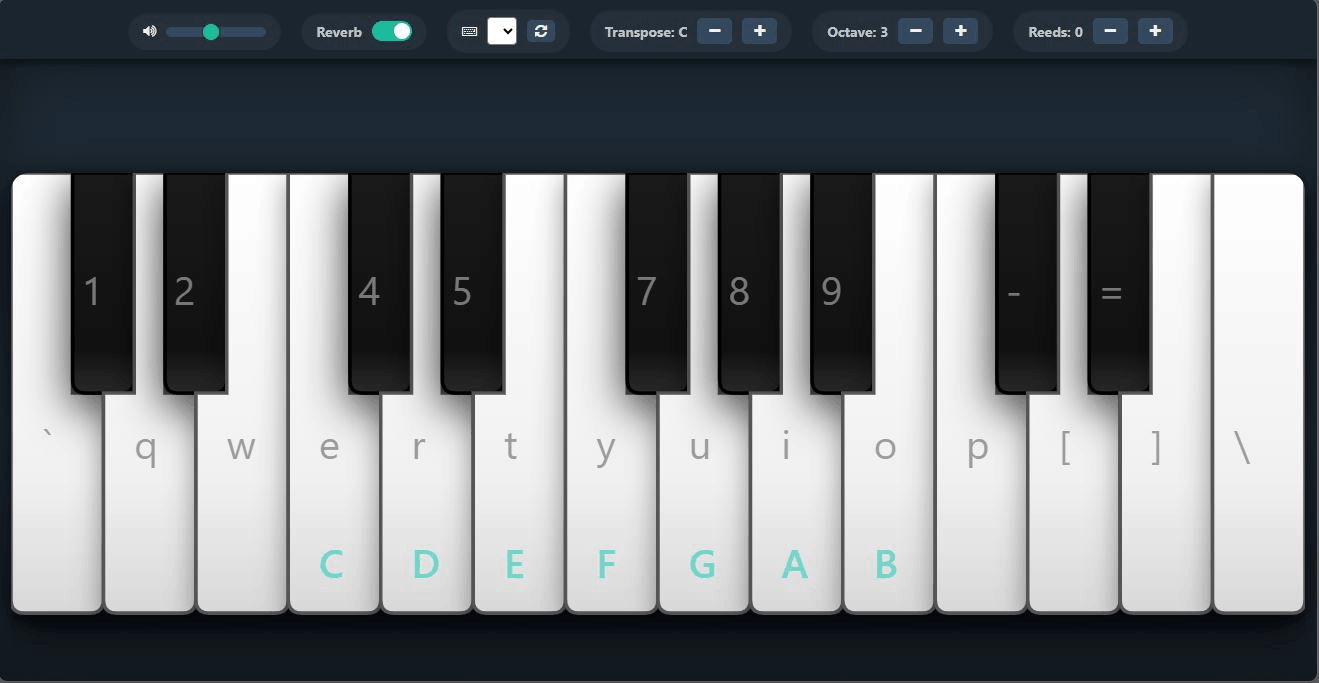
A harmonium's keyboard is about the width of your two hands side by side. On a laptop or desktop browser, a web app reproduces that comfortably; you can press Sa with your thumb and Pa with your little finger the way the physical instrument asks. On a 6-inch phone, the same octave squeezes into a strip narrower than a biscuit. Dedicated mobile apps work around this with scrollable octaves and zoom modes, and some do it well — but the fundamental screen physics doesn't change. If you practice two-handed alankars or chords, the browser on a bigger display is simply kinder.
2. Latency — press and hear
Modern phones have surprisingly good audio pipelines, and a well-coded mobile app responds almost instantly. Desktop browsers with wired headphones match that. The catch on both: Bluetooth earphones add 100–300 ms of delay, which wrecks rhythm practice on either platform. So latency is less "web vs mobile" and more "wired vs wireless" — whichever you choose, plug in the cable for riyaz.
3. Ads and paywalls — where free apps earn money
This is the least glamorous and most decisive difference. Free mobile apps need revenue, and the common model is interstitial ads — which, in a harmonium app, land mid-phrase, right when your bellows-equivalent sustain is holding a note. Some free tiers also lock transpose or reed sounds behind subscriptions. Quality web harmoniums run ad-free: the project behind Web Harmonium is open-source and funded by enthusiasm, not interruption. My free vs paid guide covers when paying for an app actually makes sense.
4. MIDI — the future-proofing factor
Web MIDI works on desktop browsers: plug a keyboard in, allow access, and you're playing a harmonium sound from real keys — the closest digital feel to the wooden box, as explained in my MIDI setup guide. Mobile apps rarely support this; Android needs OTG adapters and per-app support, and iOS support is patchy. If MIDI is in your plan at all, the web side wins by default today.
5. Offline and travel
Mobile's honest strength. Once installed, an app works in airplane mode without ceremony, and the phone is always in your pocket. A web app matches this only when installed as a PWA — Web Harmonium does this (open it once, install, and it works offline and opens like a native app) — but a plain website tab needs a connection. If your practice happens in flights, basements, and village visits with weak signal, mobile (or a PWA) earns its keep.
6. Interruptions and focus
Underrated: the phone is a notification machine, and mid-riyaz interruptions break the exact concentration practice builds. A browser tab on a laptop is a quieter room. Not absolute — you can silence the phone — but defaults matter, and the default on mobile is interruption.
7. Updates and phone switches
A web app is a URL: new features appear on refresh, and switching phones changes nothing. Mobile apps need store updates, and every phone switch means re-downloading and re-configuring. For a practice habit — which lives or dies on friction — this quiet difference adds up over months.
So which one should you use?
For daily, serious practice: the web app on the biggest screen you have, wired headphones, PWA-installed so it survives offline. For casual five-minute playing, travel days, and showing a friend a tune at dinner: a mobile app is perfectly fine, and its convenience is real. The good news is this isn't exclusive — the same notes, the same sargam, the same practice transfers. Choose the web side for the work; let mobile be the spare tyre. The full tool landscape, including where each category rates, is in my best online harmonium tools comparison.
Test both in ten minutes: open Web Harmonium on your laptop, play one full alankar — then open the same page on your phone and play it again. Your fingers will answer the web-app-vs-mobile question faster than any article can.
Frequently asked questions
Is a harmonium web app better than a mobile app?
For serious practice, yes — bigger keys, MIDI support, no ads, and no install friction. For offline travel practice and quick casual playing, a mobile app (or a PWA-installed web app) is more convenient. Most players settle on web for daily riyaz and mobile as backup.
Can I play a harmonium web app on my phone?
Yes — quality web harmoniums run in any mobile browser with touchscreen multi-finger chords. The keys are smaller than on a laptop, so single-line sargam feels fine while wide chords get cramped. Installing the page as a PWA makes it work offline like an app.
Do harmonium apps work offline?
Installed mobile apps do, and web apps do when installed as a PWA. A plain website tab needs a connection. If offline practice matters to you, either install a mobile app or install a PWA once — both then survive flights and weak-signal areas.
Why do free harmonium apps show ads?
Because ads are how free mobile apps earn revenue, and interstitials often land mid-phrase in practice. If interruption breaks your focus, choose an ad-free web harmonium — quality browser instruments run without ads and without paid locks on basics like transpose.
Can a web app use my MIDI keyboard?
Yes — desktop browsers support Web MIDI, so you can play the harmonium sound from real keys. Mobile apps rarely offer this, and Android workarounds need OTG cables. If you own or plan to buy a MIDI keyboard, the web side is currently the practical choice.
Does a PWA install feel like a real app?
Very close: it gets its own icon, opens full-screen without browser bars, and launches offline. It won't have deep system integration a native app might, but for a practice instrument, most players stop noticing the difference within a day.