How to Play Harmonium Online
Complete beginner's guide to playing our free virtual harmonium with your keyboard or MIDI device — no download required.
Free — No Install Required
Complete beginner's guide to playing our free virtual harmonium with your keyboard or MIDI device — no download required.
Learning harmonium no longer requires buying an instrument first. With Web Harmonium, you can start practicing sargam, finger placement, and basic songs directly in your browser — using only your computer keyboard or an affordable MIDI controller.
You can start playing harmonium online in under 2 minutes using the letter keys on your laptop. This guide walks you through setup, controls, and your first sargam scale.
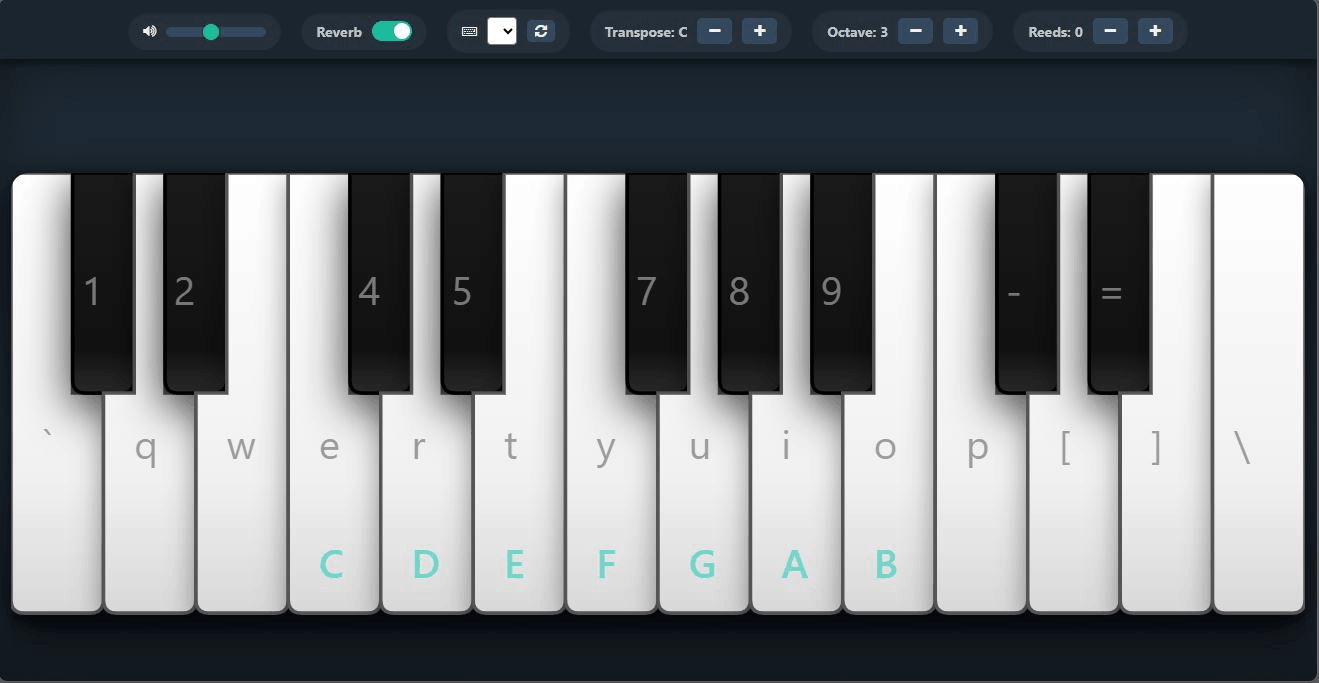
Navigate to webharmonium.vercel.app. The app displays a splash screen while it loads high-quality harmonium audio samples into your browser. Once ready, the interface shows a full two-octave keyboard with controls above it.
Tip: The first time you visit, your browser may ask permission to use audio. Click "Allow" so the instrument can produce sound. On mobile, add the site to your home screen to use it offline as a Progressive Web App (PWA).
Each virtual key displays the corresponding computer keyboard letter. White keys use letter keys; black (sharp/flat) keys use number keys and symbols.
| Virtual Key Type | Computer Keys | Notes Played |
|---|---|---|
| White keys (natural) | a, s, q, w, e, r, t, y, u, i, o, p, [, ], \, ' | Sa, Re, Ga, Ma, Pa, Dha, Ni, and upper octave |
| Black keys (komal/teevra) | `, 1, 2, 4, 5, 7, 8, 9, -, =, ; | Komal Re, Komal Ga, Teevra Ma, Komal Dha, Komal Ni |
Press and hold a key for sustained sound — just like pumping bellows on a real harmonium. Release to stop the note. The app supports simultaneous keys, so you can practice simple chords and drone-style accompaniment.
A physical harmonium produces a warm, room-filling resonance. Toggle the Reverb switch ON (or press Tab) to add a realistic convolution reverb effect that mimics a real instrument. This is especially helpful when practicing without external speakers.
Every voice and song has a comfortable pitch range. Use these controls to match yours:
For a more authentic playing experience, plug any USB MIDI keyboard into your computer. Select it from the MIDI Keyboard dropdown, allow browser permission, and play with real piano-style keys. See our detailed MIDI setup guide →
| Action | Shortcut |
|---|---|
| Volume Up / Down | Arrow Up / Down |
| Transpose semitone | Arrow Left / Right |
| Change octave | Page Up / Page Down |
| Toggle reverb | Tab |
| Add/remove reeds | Alt + Left / Right Arrow |
After learning the key layout, every beginner should master the Bilawal Thaat (C major equivalent): Sa Re Ga Ma Pa Dha Ni Sa. This builds muscle memory and trains your ear. From there, move to simple bhajans or film songs in the same scale.
We recommend following our Sargam Notes Chart to understand harmonium sargam notes and then our Finger Placement Guide for smooth playing techniques.
Yes. Web Harmonium is a free virtual harmonium that runs in your browser. You can practice sargam, finger techniques, and simple songs using your computer keyboard or a MIDI keyboard. It is an excellent starting point before investing in a physical harmonium.
No download is required. Web Harmonium runs entirely in your web browser. You can also install it as a Progressive Web App (PWA) on your phone or desktop for offline use after the first visit.
Yes, Web Harmonium is completely free and open-source under the MIT License. There are no subscription tiers, in-app purchases, or hidden fees.
Yes. The app is fully responsive and supports touch. On Android and iOS, you can add it to your home screen for a native app experience and even use it offline.
Yes. Web Harmonium works as a harmonium mobile app in your browser on both Android and iOS. Simply visit the website, and you can start harmonium online play immediately using touch controls. You can also add it to your home screen for offline practice.
Absolutely. Web Harmonium is the ideal harmonium app for beginners because it is free, requires no installation, and works on any device. You can practice sargam scales, learn finger positioning, and experiment with different ragas before investing in a physical instrument.
For the best PC harmonium experience, use a modern browser like Chrome or Edge, connect a USB MIDI keyboard if you have one, enable reverb for authentic tone, and use quality headphones. The larger screen and physical keyboard of a PC make it perfect for serious practice sessions.