Online Keyboard Interface
Play virtual harmonium on PC, laptop, or mobile touchscreens with responsive digital keys and zero-install offline access.
Works Offline — PWA Ready
Play virtual harmonium on PC, laptop, or mobile touchscreens with responsive digital keys and zero-install offline access.
An online virtual harmonium keyboard makes practicing music incredibly accessible. You do not need to carry a heavy physical instrument to stay on top of your daily sargam riyaz. Modern web-audio technology allows Web Harmonium to run natively in your browser on PC laptops, mobile touchscreens, and tablets. This comprehensive guide highlights the physical keyboard mappings, PWA setup steps for offline practice, and key differences across hardware setups.
On PC and laptop browsers, map your home row keys (ASDF) for white notes. For mobile phones, install the web app as a Progressive Web App (PWA) to enable fullscreen, distraction-free offline touch play.
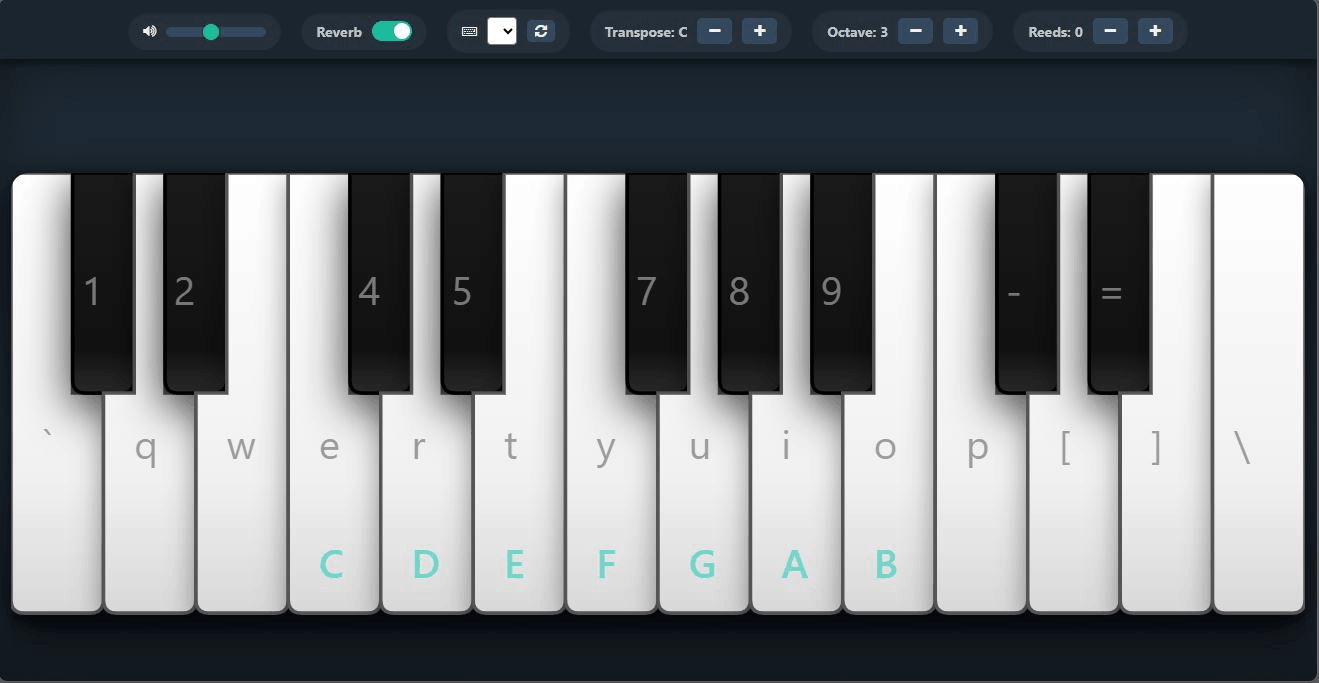
When playing Web Harmonium on a desktop browser or laptop, your physical QWERTY computer keys map directly to the corresponding musical notes. This lets you practice scales like piano keys without clicking with your mouse:
The physical characteristics of your playing setup heavily affect key response, hand stance, and structural speed. Review the detailed comparative matrix below to choose your ideal learning environment:
| Factor | PC / Laptop (QWERTY) | Mobile Screen (Touch) | Tablet / iPad (Touch) |
|---|---|---|---|
| Key Response | High tactile feedback via physical key switches. | Zero physical resistance; glass surface. | Zero resistance; flat glass surface. |
| Stance | Straight, resting wrists on the desk surface. | Thumb-held horizontal or flat surface. | Flat on desk; best for realistic spacing. |
| Sound Latency | Ultra-low (desktop processors process audio faster). | Varies by phone; minor touch digitizer lag. | Low on iPad; very responsive audio engine. |
| Chord Play | Easy (allows multiple keys to register). | Challenging on small screens (limited space). | Highly comfortable for multi-note drones. |
| Best Use Case | Formal daily riyaz and sargam exercises. | Checking pitches on the go, vocal warmup. | Practicing devotional songs away from desk. |
You do not need to download an application from the Google Play Store or iOS App Store. Web Harmonium is built as a Progressive Web App (PWA), meaning you can install it directly from your web browser to enjoy offline access, fullscreen execution, and launch from your home screen.
webharmonium.vercel.app.webharmonium.vercel.app.Ensure you close heavy browser tabs (especially resource-demanding games or streaming video) before starting your session. This frees up RAM and enables the browser's Web Audio API to trigger sound waves instantly when you hit a key.
Physical harmonium reeds create a dense harmonic vibration that typical laptop speakers cannot reproduce. Wearing headphones allows you to hear the subtle beating frequencies between drone notes and the main melody.
In the virtual app, notes will sustain infinitely as long as they are held down. To practice real finger lifting techniques, simulate bellows pumping by lifting your melody hand slightly at natural breath intervals.
Yes. Web Harmonium fully supports Web MIDI. You can connect a standard electronic keyboard or digital piano via USB and play it like a real harmonium. See our MIDI Integration Guide.
Most mobile operating systems (especially iOS) block web audio until the user makes an explicit interaction. Tap any key on the screen once to authorize the browser, and make sure your phone's physical silent switch is toggled off.
Yes. The mobile interface supports multi-touch, meaning you can hold a sustained low drone with one finger while playing sargam runs with another.