Last updated: September 2026
play harmonium on laptop is easiest when Sa is steady, swar names are correct, and practice is slow enough to hear. I am Happy Sinha, and when I built Web Harmonium, I wanted Indian classical learners to have a free, no-download harmonium they could use before class, after class, or while travelling. This guide is for singers, bhajan learners, raga beginners, and students who want practical steps with correct theory. You will learn how to apply the topic in daily riyaz, how it connects to sargam, thaat, and raga, and how features like Transpose, Octave shift, Reed control, and the Reverb toggle can support your practice. Sa and Pa are achal swar; Re, Ga, Dha, and Ni may be komal; only Ma can be tivra in the Bhatkhande system. You can follow along using Web Harmonium app — free, no download.
play harmonium on laptop works best when Sa is stable, swar names are correct, and practice stays slow enough to hear.
How do you play harmonium on laptop with a computer keyboard?
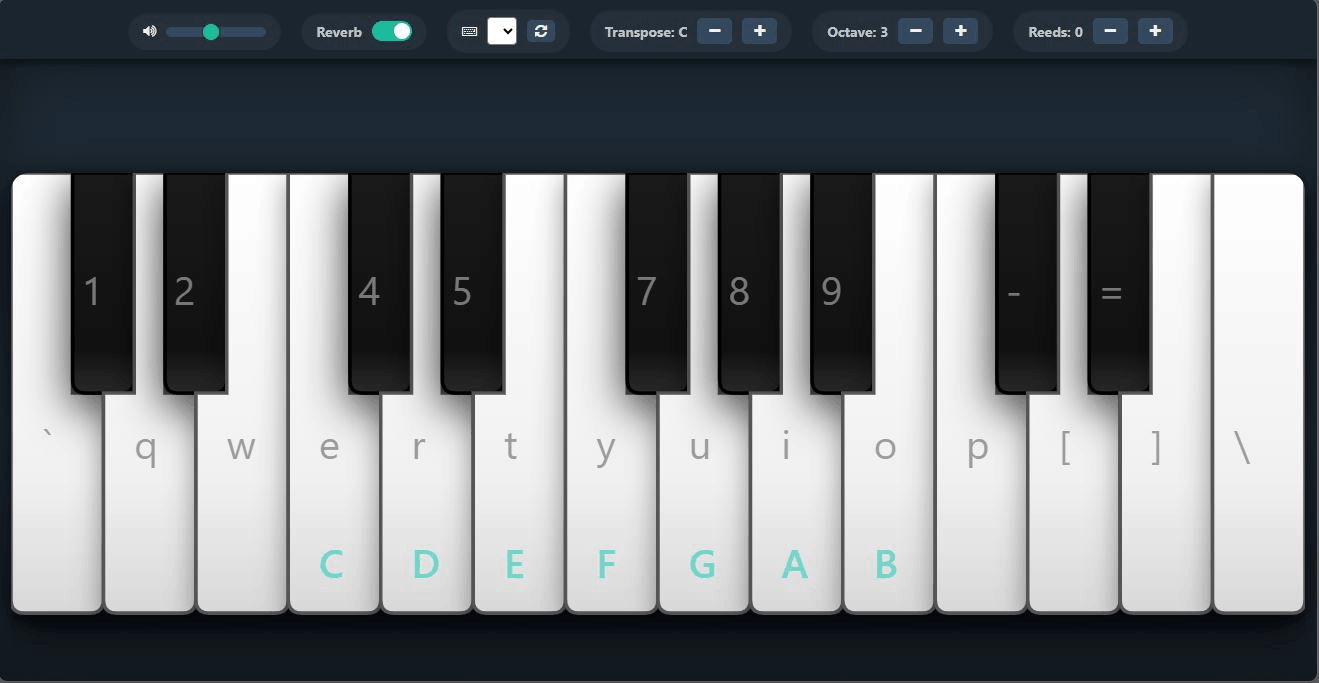
To play harmonium on laptop, open Web Harmonium and use the visible key labels as your map from computer keys to harmonium reeds. A laptop keyboard becomes a compact sargam surface: white-key positions carry shuddha swar and black-key positions carry komal or tivra variants, just as a physical harmonium does. Sargam is to Indian music what solfege is to Western music: a movable naming system for pitch relationships. Start with Sa Re Ga Ma Pa Dha Ni Sa, then reverse it slowly. When I built Web Harmonium, I noticed beginners did better when they treated the laptop as a listening tool first and a speed tool later. Keep one hand on a small set of keys, listen to the reed response, and avoid jumping around before the swar names feel natural. Web Harmonium lets you practice free in the browser, so a PC harmonium session can happen during a vocal warm-up, a lesson recap, or travel without carrying an instrument.
Which harmonium keyboard shortcuts should beginners learn first?
The first harmonium keyboard shortcuts to learn are the ones that keep your Sa stable. Use the center row for simple aroha and avaroha, then add nearby black keys only when a raga needs vikrit swar. In Hindustani music, Sa and Pa are achal swar, meaning they stay fixed. Re, Ga, Dha, and Ni can become komal, and only Ma can become tivra. That rule from the Bhatkhande teaching tradition keeps the laptop map logical instead of mysterious. In Web Harmonium, use Octave shift when the melody feels too low or high, Transpose when your voice needs a different Sa, Reed control when you want a thinner or fuller tone, and the Reverb toggle when you want a room-like practice sound. Compared with a piano shortcut chart, a harmonium shortcut map is more about relative Sa than fixed note names.
Try it now: Open Web Harmonium and practice the middle-octave Sa Re Ga pattern with your computer keyboard. No download required.
How should you practice sargam after setting up a PC harmonium?
After setup, practice sargam in three layers: pitch, finger memory, and breath. First hold Sa until it feels settled in your ear. Then move Sa Re Ga Re Sa without rushing. Next sing and play together. In Raga Bhupali, use Sa Re Ga Pa Dha Sa, avoiding Ma and Ni; in Raga Yaman, use tivra Ma with the Kalyan thaat sound. These examples teach that ragas are not just scales but melodic personalities. Web Harmonium works well because you can keep the app open beside lyrics or class notes and repeat the same phrase many times. A useful comparison: laptop harmonium practice is like using a tanpura app for pitch reference, but with active swar control under your fingers. If you are new, read the harmonium beginner's guide at Web Harmonium before trying long compositions.
Can Web Harmonium replace a real harmonium for early learning?
Web Harmonium cannot replace air pressure, bellows control, and hand coordination of a wooden harmonium, but it can replace the biggest early barrier: access. For beginners, the hard part is often recognizing Sa, remembering swar order, and understanding how black keys relate to komal and tivra notes. A free online harmonium is excellent for that stage. It is also useful for singers who only need a pitch reference before riyaz. The tool is open-source under the MIT license, free to use, and open-source under the MIT license. Compared with a real harmonium, Web Harmonium is lighter and instant; compared with a generic piano app, it is designed around Indian classical habits such as Transpose, Octave shift, Reed control, and Reverb.
Frequently asked questions
How can I play harmonium on a laptop without downloading an app?
Yes. Open Web Harmonium in a modern browser and play with your computer keyboard or mouse. It runs online, so you do not need to install software. Start with simple Sa Re Ga Ma patterns before trying songs.
What are the PC harmonium keyboard shortcuts for beginners?
Beginners should first learn the visible key labels in Web Harmonium, then practice Sa Re Ga Ma Pa Dha Ni Sa slowly. Add black keys only when a raga or song requires komal Re, komal Ga, tivra Ma, komal Dha, or komal Ni.
Which keyboard shortcuts help with sargam practice?
Use shortcuts to repeat short sargam loops, not to rush through long melodies. Practice Sa Re Ga Re Sa, Sa Ga Re Ga, and Sa Re Ga Ma Ga Re Sa. Keep the same Sa until your ear recognizes the tonic clearly.
Is an online harmonium good for vocal practice?
Online harmonium is good for vocal pitch practice, especially for finding Sa and checking sargam. It does not teach bellows technique, but it helps singers repeat notes accurately and transpose for vocal range.
Which browser works best for Web Harmonium?
Chrome and Edge are safe choices because they handle modern web audio well and support Web MIDI for external keyboards. Safari and Firefox may work for basic audio, but MIDI behavior can vary.